Scamalytics is an IP fraud-intelligence platform that assigns a 0–100 risk score to any IP address to show its likelihood of being involved in malicious activity. High scores alert businesses to proxy connections, bot networks, or past fraud reports. This guide breaks down how Scamalytics calculates fraud scores, how to choose the right risk thresholds for your business, and how it compares to alternative providers.
Visitor IP Address ➔ Scamalytics API ➔ Fraud Score (0–100) ➔ Rules Engine ➔ Allow, Challenge, or Block
What Is Scamalytics? (Definition and Use Cases)
Scamalytics Definition: Scamalytics is a digital threat intelligence platform that analyzes IP addresses to prevent online fraud. It gives every IP address a score from 0 to 100. A score of 0 means low risk, while 100 means high risk.
Scamalytics acts as an early warning system for websites and apps. When a user creates an account, buys a product, or logs in, Scamalytics checks the user’s IP address. It looks for signals that the user might be hiding their location or using an automated bot.
Core Features and Capabilities
- IP Fraud Scoring: Returns a real-time risk score from 0 to 100 based on network threat data.
- Anonymization Detection: Identifies if an IP belongs to a VPN, residential proxy, public proxy, or Tor exit node.
- Infrastructure Classification: Distinguishes between residential internet providers and datacenter hosting providers.
- Flexible Integration Options: Offers real-time API calls and bulk IP lookups.
Who Uses Scamalytics?
- Trust and Safety Teams: Dating apps use it to block romance scammers before they message users.
- Fintech and Banking Developers: Risk managers use it to stop fake account signups and identity theft.
- E-Commerce Merchants: Stores use it to prevent credit card chargebacks and stop scalper bots.
- Proxy and IP Buyers: Marketers and data analysts test proxy pools before buying them to ensure clean IP addresses.
How the Scamalytics Fraud Score Works
Core Function: The Scamalytics fraud score predicts the risk of an IP address using historical abuse reports, proxy detection, and subnet analysis. Higher scores indicate higher observed fraud risk based on historical data.
Scamalytics combines several data streams to generate its top-line score. It does not treat an IP address as an isolated point. Instead, it looks at the entire digital neighborhood.
+-----------------------------------------------------------------------+
|                        SCAMALYTICS DATA INPUTS                        |
+-----------------------------------------------------------------------+
|  1. Shared Fraud Reports    ➔ Confirmed abuse from partner networks    |
|  2. Network Neighborhood   ➔ Risk of surrounding Subnet, ASN, Host    |
|  3. Connection Signals     ➔ VPN, Tor, Datacenter, Residential Proxy |
|  4. Location & ISP Info    ➔ Geolocation consistency & ISP reputation |
+-----------------------------------------------------------------------+
The 4 Core Data Inputs
- Shared Fraud Reports: Scamalytics gathers live abuse data from its partner network. If an IP attempts a fake sign-up on a dating app, other clients get notified through updated risk scores.
- Network Neighborhood: If your neighbor commits a crime, your street does not become guilty. But in IP routing, bad behavior spreads. If dozens of servers in a specific subnet or Autonomous System Number (ASN) run spam bots, Scamalytics marks the whole subnet as risky.
- Anonymization Signals: Real users typically connect through standard home or mobile internet providers. If an IP routes through a datacenter, a commercial VPN, or a Tor exit node, the risk score rises immediately.
- Geolocation and ISP Data: Scamalytics reports ISP/operator and proxy/Tor status; these signals contribute to risk assessment.
Why Scores Change Over Time
IP addresses shift owners frequently. An IP assigned to a spam bot today might get reassigned to a home broadband user next month.
Scamalytics updates risk data based on ongoing fraud reports; scores can change as new data is received.
Interpreting Scamalytics Scores: Ranges, Thresholds, and Business Rules
Quick Answer: A Scamalytics score under 20 is low risk and safe for most automated flows. Scores between 20 and 75 require secondary checks, while scores above 75 point to high-risk proxies or active fraud networks and should be blocked.
| Score Range | Risk Level | Suggested Action |
| 0 – 15 | Low | Allow access automatically |
| 16 – 40 | Medium-Low | Allow, monitor activity |
| 41 – 70 | Medium-High | Challenge (CAPTCHA, SMS verify) |
| 71 – 100 | High | Block or require manual review |
Industry Threshold Examples

Different industries carry different financial risks. A gaming site can tolerate higher risk than an online bank.
RECOMMENDED BLOCK THRESHOLDS BY INDUSTRY
Dating & Romance   [20 - 25]  <-- Strict (High risk of scam profiles)
AI Platforms       [25 - 30]  <-- Strict (Prevents proxy scraping & abuse)
Fintech Signups    [40 - 50]  <-- Medium (Step-up ID verification)
E-Commerce Checkout[60 - 70]  <-- Flexible (Prevents lost legitimate sales)
1. Dating and Romance Platforms (Strict Threshold: 20–25)
Romance scams cause severe financial and emotional harm. Fake profiles use commercial VPNs and datacenter IPs to mask overseas locations. Set your rules engine to force phone verification for scores above 20, and block registrations above 40.
2. AI Platforms and SaaS Apps (Strict Threshold: 25–30)
AI services face heavy scraper traffic and unauthorized access via residential proxies. Some AI platforms have been observed to challenge or block traffic with Scamalytics scores above ~25–45; thresholds vary by provider.
3. Fintech and Onboarding (Balanced Threshold: 40–50)
Fintech companies must stop identity theft without turning away legitimate customers who use personal VPNs for privacy. Allow scores under 40. For scores between 41 and 70, require secondary verification, like two-factor authentication (2FA) or an ID scan.
4. E-Commerce and Retail Checkouts (Flexible Threshold: 60–70)
Blocking a customer at checkout causes direct revenue loss. Block orders only when scores exceed 70 or when a high score pairs with a mismatched billing address.
Checklist for Setting Business Thresholds
- [ ] Review past sales data: Match past chargebacks against server logs to see what fraud scores those IPs carried.
- [ ] Separate registration from payment: Apply stricter thresholds to cash withdrawals and user sign-ups than to initial browsing.
- [ ] Combine signals: Never rely on the IP score alone. Combine it with device fingerprinting and email verification.
- [ ] Log blocked traffic: Record all blocked connections to track false positives and adjust rules over time.
Scamalytics vs. IPQualityScore vs. IP2Location
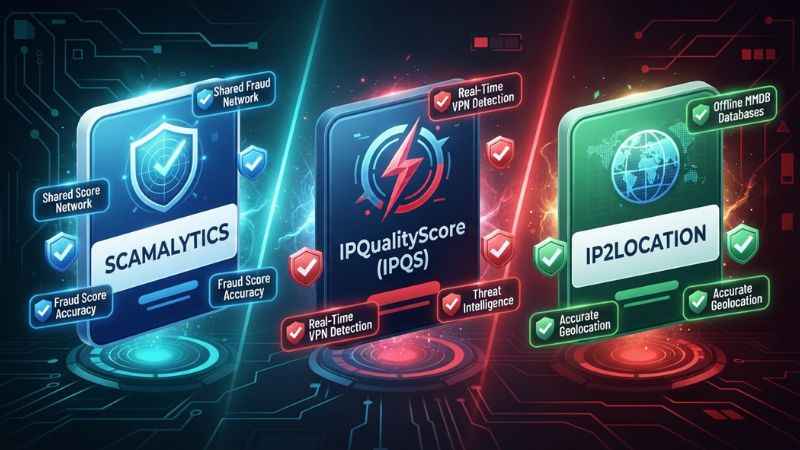
When choosing an IP intelligence tool, compare data accuracy, proxy detection speed, and integration options.
| Feature | Scamalytics | IPQualityScore (IPQS) | IP2Location |
| Primary Focus | Fraud scoring & threat feeds | Live proxy & bot detection | Precise IP geolocation |
| Best For | Dating, fintech, trust & safety | Ad fraud, bot blocking, e-commerce | Local content targeting, analytics |
| Main Strength | Shared fraud network history | Real-time proxy detection accuracy | Extensive offline database options |
| Common Score Divergence | Flags subnet risk early | Flags active VPN connections instantly | Focuses on proxy type rather than risk score |
| Integration Methods | Real-time API, Bulk Lookup | Real-time API, Bulk, Proxy lookup | Flat file, MMDB, SDKs, REST API |
Why Tool Scores Disagree for the Same IP
An IP address might score 15 on Scamalytics, 65 on IPQualityScore, and show as a clean residential IP on IP2Location. This happens for three primary reasons:
- Different Data Sources: Scamalytics emphasizes shared fraud history and network neighborhood risk. Other tools may prioritize live proxy scans or geographic registration records.
- Neighborhood Weighting: Scamalytics penalizes an IP if the surrounding subnet has a bad history. IPQS focuses primarily on the single IP’s current behavior.
- Update Speed: One database may detect an IP assigned to a datacenter within hours, while another updates its records monthly.
Which Provider Should You Pick?
- Choose Scamalytics if you manage a dating app, online platform, or social network where shared fraud patterns predict future abuse.
- Choose IPQualityScore if you fight click fraud, ad spoofing, or automated account takeovers that use fresh residential proxies.
- Choose IP2Location if you need offline database downloads to route web traffic by geographic region.
How to Check an IP on Scamalytics (Free Lookup and Bulk Options)
Checking individual IPs helps support teams investigate disputed account suspensions.
+-----------------------------------------------------------------------+
|                    10-MINUTE PROXY QUALITY CHECKLIST                  |
+-----------------------------------------------------------------------+
|  [ ] Step 1: Open the free Scamalytics lookup web page.              |
|  [ ] Step 2: Paste your IP address into the search box.               |
|  [ ] Step 3: Check the top-line Fraud Score (Target: under 15).        |
|  [ ] Step 4: Verify the Anonymizer tag (Target: "No VPN / No Proxy"). |
|  [ ] Step 5: Review the Host Name and ASN for datacenter flags.      |
|  [ ] Step 6: Cross-check high-value IPs on a secondary tool (IPQS).   |
+-----------------------------------------------------------------------+
Performing a Free IP Lookup
- Go to the official Scamalytics IP lookup tool.
- Type or paste the target IP address into the input field and click search.
- Review the output summary:
- Fraud Score: Top-line risk rating (0 to 100).
- Operator / ISP: The company that owns the network connection.
- Proxy / VPN / Tor / Datacenter Flags: Identifies anonymizing tools.
Using Bulk IP Lookups
Analyzing large lists of IPs through the web interface takes too long. Use the bulk lookup option instead:
- Bulk IP lookup is available; formats and delivery method are provided via your account or API.
- Download the completed output file. It includes risk scores, threat categories, and country codes for every line item.
Integrating Scamalytics: API and Bulk Jobs
Scamalytics offers integration models based on speed and budget requirements.
INTEGRATION ARCHITECTURE
[ Web User ] ➔ [ Web Server ] ➔ (1. Real-time API)  ➔ [ Scamalytics Cloud ]
                     |
                     +--------> (2. Bulk IP Lookup) ➔ [ Nightly Cron Job ]
1. Real-Time API Integration
The API setup queries Scamalytics directly during user actions (like account registration or payment processing).
- How it works: Your server sends an HTTPS request containing the user’s IP address. Scamalytics returns a JSON response containing the risk score and connection details within milliseconds.
- Best use case: Real-time fraud prevention during account creation, login, or checkout.
- Consideration: Set a strict API request timeout (such as 300ms). If the API call times out, fallback to allowing the transaction or applying a default middle-tier rule so user experience is not impacted.
2. Bulk IP Lookup Processing
- How it works: Run scheduled batch processing scripts or use bulk lookup options to evaluate logged-in IPs.
- Best use case: Post-transaction fraud audits, security reviews, and cleaning email lists.
Common Mistakes and How to Avoid Them
Avoid these common mistakes when setting up IP-based fraud scoring:
- Treating the Score as Absolute Proof: A high score indicates statistical risk, not absolute proof of malice. Never ban accounts permanently based solely on an IP score. Use step-up authentication instead.
- Ignoring False Positives on Public Wi-Fi: Cellular towers, airport Wi-Fi networks, and corporate offices route thousands of clean users through a shared IP address. If one person on that network commits fraud, the shared IP score rises, affecting innocent users.
- Using Rigid National Rules: Banning entire subnets or hosting providers blocks legitimate privacy-conscious users who rely on commercial VPNs for routine browsing.
- Failing to Audit Rules Regularly: Fraud patterns shift quickly. Review your threshold settings every quarter to ensure you are not blocking legitimate customers.
Frequently Asked Questions
What do Scamalytics score ranges (low/medium/high) mean?
A score of 0 to 15 means low risk (safe connection). A score of 16 to 70 means medium risk (potential VPN, proxy, or shared network). A score of 71 to 100 means high risk (frequently linked to active fraud, bots, or malicious networks).
How do I check my IP on Scamalytics?
Visit the free IP lookup page on the Scamalytics website. The tool detects your current IP address automatically and displays its fraud score, ISP owner, and proxy status.
How do I get a Scamalytics API key and integrate it?
API access is available via paid/free tiers; obtain your API key from your account area to start making HTTP lookup requests.
Why do Scamalytics and other tools show different scores for the same IP?
Scamalytics emphasizes shared fraud history and network neighborhood risk. Other tools may prioritize live proxy scans or geographic registration records. These varied data sources often lead to different risk scores for the same IP address.
Is Scamalytics legit and accurate?
Yes, Scamalytics is a widely trusted threat intelligence platform used by businesses in banking, payments, classifieds, reviews, and dating.
What is a good Scamalytics score for dating sites, fintech, or e-commerce?
For dating platforms and AI apps, target a score below 20. For fintech onboarding, target a score below 40. For general e-commerce transactions, scores up to 60 are acceptable if the billing and shipping details match.
Can I use Scamalytics for bulk IP checks?
Yes. Bulk IP lookup is available; contact Scamalytics for bulk formats and delivery options.
How often should I re-evaluate my thresholds?
Audit your risk threshold rules quarterly. Compare your current settings against recent chargeback rates, false positive reports, and conversion data to optimize performance.
Next Steps for Fraud Prevention
If you want to implement Scamalytics on your platform, follow these initial setup steps:
- Test your current IP logs: Run a sample batch of 100 recent user IP addresses through the lookup options.
- Identify your target threshold: Match those test scores against known good and bad user accounts to establish your baseline threshold.
- Set up API key access: Obtain your API key from your account area and configure your registration rules to flag IPs scoring above your target threshold.
You May Also Like: |
NewsLikeYou.com Explained: What It Publishes and How Trustworthy Is It?
Wallpostmedia.com Review (2026): Is It Legit, Safe, and Worth Using?

Joseph Quinn is the founder and editor of Punspa, a technology-focused website covering technology, website reviews, internet terms, and other things worth figuring out online. He writes and edits the site’s technology and web content, with a focus on clear, useful explanations. He also enjoys humor and wordplay, which occasionally leads him to write a pun-related article just for the fun of it.