If you cannot open your bellsouth.net email, do not panic. Your account is not deleted. AT&T bought BellSouth in 2006, but your old email address still works.
To read your messages today, sign in via the AT&T Mail page for BellSouth (https://more.att.com/login/bellsouth-email), which uses the currently.com portal. Use your full email and password on the web. For apps like Outlook, use a Secure Mail Key, not your regular password.
This simple guide will show you how to log in, fix common sign-in errors, update your server settings, and set up your inbox on your phone or computer.
How to Log In to Your BellSouth.net Email
BellSouth no longer has its own mail site. Use the AT&T Mail login page for BellSouth. This change is normal and safe.
Quick Steps for Web Access
- Open your web browser and go to currently.com.
- Click the Sign In button in the top-right corner.
- Type your full email address (example:
[email protected]). - Type your account password.
- Click Sign In to open your inbox.
Safety Tip: Always check your browser’s address bar. Make sure the web address says currently.com or att.com. Never enter your login details on unfamiliar sites.
Why You Can’t Log In (And How to Fix It)
If you get an error message when you try to sign in, do not worry. Most login problems come down to three common causes.
       [Can't Access BellSouth Email?]
                      │
           Can you sign in on the web
               at currently.com?
                 /          \
               YES           NO
               /              \
    [App Setup Issue]     [Account Issue]
            │                    │
   Generate a Secure    Reset password at
     Mail Key in          att.com and
    AT&T profile.        clear cache.
1. Wrong Password or User ID
AT&T uses a single sign-in called an AT&T ID. If you changed your main AT&T password recently, your old email password might not work anymore.
- The Fix: Use the “Forgot password” link on the AT&T Mail sign-in page, or visit AT&T Email Support at https://att.com/support to create a new one.
2. Account Lockouts
AT&T may lock accounts for safety. Reset your password to regain access.
- The Fix: Reset your password on the AT&T site. Resetting your password unlocks your inbox automatically.
3. Saved Cookies and Cache Issues
Old files saved in your web browser can cause login pages to load incorrectly or loop back to the start.
- The Fix: Clear your browser cache and cookies. You can also try opening a private window (Incognito mode) to log in.
BellSouth Email Server Settings (IMAP, POP3, SMTP)
If you use email programs like Outlook, Apple Mail, or Thunderbird, you must enter the correct server settings. BellSouth uses the standard AT&T mail servers.
Use IMAP if you want mail on multiple devices. POP3 still works for a single device. IMAP syncs your messages across your phone, tablet, and computer at the same time.
| Setting | Incoming Server (IMAP) | Outgoing Server (SMTP) |
| Server Address | imap.mail.att.net | smtp.mail.att.net |
| Port | 993 | 465 (SSL) — main. 587 (STARTTLS) — many apps. |
| SSL Required? | Yes | Yes |
| Username | Your full email address | Your full email address |
| Password | Secure Mail Key | Secure Mail Key |
If you need to use the older POP3 format, use these details:
Incoming POP3 Server: inbound.att.net
Port: 995
Requires SSL: Yes

Outgoing SMTP Server: outbound.att.net
Port: 465
Requires SSL: Yes
How to Set Up BellSouth Email on Outlook, iPhone, and Android
Adding your email to an app usually fails for one specific reason: your normal password will not work in email software.
If your app does not support OAuth, AT&T requires a Secure Mail Key.
Step 1: Create a Secure Mail Key
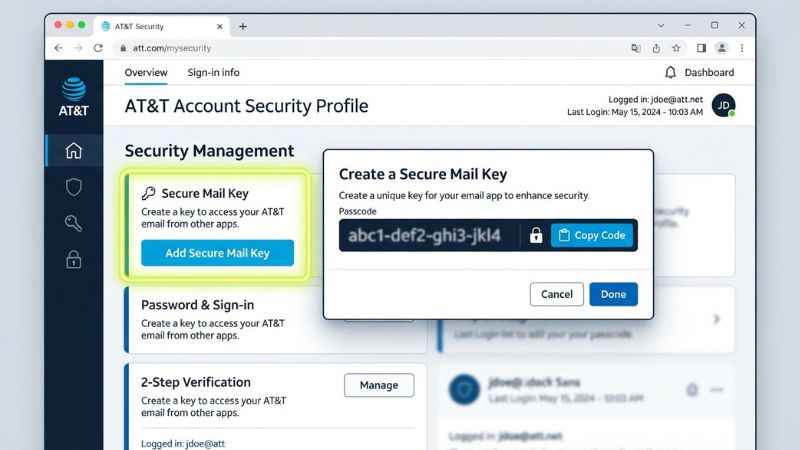
A Secure Mail Key is a special 16-character code that takes the place of your regular password inside app settings. It keeps your main account password safe. AT&T recommends a separate key for each device or app.
- Go to https://att.com/myatt, open Profile, then Sign-in info, then Secure Mail Key.
- Click Add secure mail key.
- Type a label for your key (like “iPhone Mail” or “Outlook Computer”).
- Click Create Secure Mail Key.
- Copy the 16-character code shown on screen.
Step 2: Set Up Your App
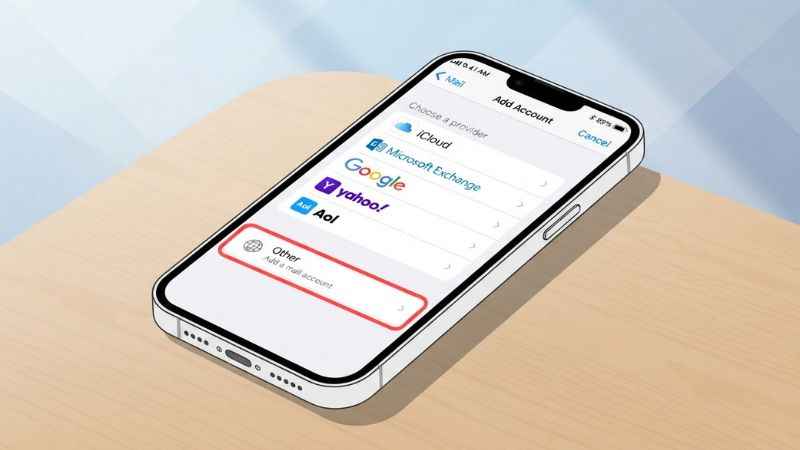
- iPhone & iPad (Apple Mail): In iPhone Mail, choose Other > Add Mail Account and enter IMAP settings. Use a Secure Mail Key.
- Android (Gmail App): If OAuth is available, select Yahoo. Otherwise, use IMAP with a Secure Mail Key.
- Microsoft Outlook: Steps vary by Outlook version. Use
imap.mail.att.netandsmtp.mail.att.netwith a Secure Mail Key. Open Outlook and add your account manually using IMAP, and paste your Secure Mail Key into the password field.
Common BellSouth Email Problems & Solutions
“Mailbox Full” Error
A full mailbox can block new mail.
- Solution: On currently.com, open Spam and Trash, then empty them to free space. These folders count against your overall storage space.
Important Emails Going to Spam
Sometimes real messages end up in your junk folder by mistake.
- Solution: Open your Spam folder on the web. Select the good email and click Not Spam. Add the sender’s address to your personal contacts list so future messages go straight to your inbox.
“Connection Timed Out” Errors
If your app stops syncing, your computer firewall or security software might be blocking the connection.
- Solution: Temporarily pause your antivirus program to test your connection. Make sure your firewall allows traffic on ports 993 and 465.
Is BellSouth Email Going Away?
No, the service is not going away.
AT&T bought BellSouth in 2006. While AT&T stopped giving out new @bellsouth.net addresses long ago, they still support existing accounts.
Your address is considered a “legacy account.” Eligible BellSouth accounts can continue to be used through AT&T Mail. Access depends on account status.
Security: Protecting Your Legacy Account
Older email accounts are popular targets for online scams because many owners have not updated their security settings in years.
- Use a Unique Password: Do not use the same password on other websites. If another site gets hacked, criminals can test your details on AT&T.
- Turn On Two-Factor Authentication: Turn on extra security (2FA) in your AT&T profile and add a phone number for codes. This sends a text message verification code whenever someone tries to sign in from a new computer.
- Watch Out for Fake Support Scams: AT&T will never call you asking for your password or charge you money to unlock your inbox. Avoid calling phone numbers found on random blogs. Use https://att.com/support for official help.
Frequently Asked Questions
Can I create a new BellSouth email address?
No. AT&T no longer creates new @bellsouth.net email accounts. You can only keep using an existing address created before the merger.
What do I do if I forgot my security questions?
Use the “Forgot password” link on the AT&T Mail sign-in page, or visit https://att.com/support. Select the option to receive a temporary verification code by text message or secondary email instead of answering questions.
Can I forward my BellSouth mail to Gmail?
Forwarding may be available in webmail settings, but steps vary. Check currently.com settings.
Is BellSouth email the same as Yahoo?
AT&T partners with Yahoo to run its webmail service. That is why the online inbox looks like Yahoo Mail and why Yahoo app options work for automatic sign-ins.
How do I contact official support?
Visit https://att.com/support or call 1-800-288-2020. Do not pay third-party companies that ask for money to fix your account.
You May Also Like:
What Is anythingshare.com? Site Overview, Safety, and Guest-Post Guide
G15Tool.com Gadgets: The Complete Buyer’s Guide & Legitimacy Check

Joseph Quinn is the founder and editor of Punspa, a technology-focused website covering technology, website reviews, internet terms, and other things worth figuring out online. He writes and edits the site’s technology and web content, with a focus on clear, useful explanations. He also enjoys humor and wordplay, which occasionally leads him to write a pun-related article just for the fun of it.