Are you looking for filesxpress.com to send a large file, check a link, or see if the site is safe? Here is the fast answer: based on testing and third-party summaries, filesxpress.com appears to no longer be an active file-sharing service. It is now a general blog with posts on travel, tech, and business.
If you try to upload private files to filesxpress.com today, the tool appears not to work based on our testing. Even worse, if you share sensitive data on any untrusted site, you could expose your data to unknown owners. This guide explains what happened to the domain, checks safety considerations, and gives you the best secure alternatives to share files online right now.
What Is FilesXpress.com? (Current Status vs. Historical Purpose)
Many people remember filesxpress.com as an easy tool for sending big files over the internet. Today, the website looks completely different.
Original Purpose: File Sharing and Upload Service
According to third-party summaries, filesxpress.com worked like many simple file-hosting sites years ago. You opened the home page, selected a document or image, uploaded it, and got a short link. You could email that link to a friend or coworker, and they could download the file. Common uses for file-sharing sites include:
- PDF documents and office files
- Image folders and vacation photos
- Slide presentations for school or work
Current State: Repurposed as a General Blog
Today, filesxpress.com appears to no longer run a working file-transfer tool. Instead, the owner turned the domain into a general blog. When you open the site, you will see blog categories like:
- Education
- Travel
- Technology
- Business
- General topics
This happens often when an old website shuts down. A new owner buys an expired web address and builds a blog on it to get traffic from old links.
Why the Confusion? Similar Domain Names
Part of the confusion comes from other real services with similar names. Make sure you do not mix up filesxpress.com with these active tools:
- File & ServeXpress: A legal eFiling tool used by courts and lawyers to submit legal papers.
- File-Express: A Swiss secure file transfer service built for business data.
- FileXpress ERP: Business management software used in Central America.
- American Express FileXpress: An enterprise file tool for Amex business clients.
If you are trying to submit legal forms or business files, you are likely looking for one of those other platforms, not filesxpress.com.
Is FilesXpress.com Safe and Legitimate? (2026 Safety Analysis)
If you visit the blog to read an article, the site will open in your browser. But is it safe to use or trust with your information?
Trust Score Breakdown (Multiple Tools)
When checking online safety tools for repurposed domains like filesxpress.com, general security scanners typically report mixed or low trust ratings. No specific public reports from HasTrust, ScamAdviser, WebSafeChecker, or F-Secure for filesxpress.com were linked at time of writing. Automated checkers often flag sites when domain ownership changes or when expected business contact details are unclear. General site security checks indicate that while blog pages may be safe to browse without active web malware, file upload features appear inactive.
Security Features (SSL, Encryption, Malware Scans)
The website uses basic HTTPS encryption, which keeps your web browser connection private while you read pages. However, HTTPS only means your connection is encrypted. It does not mean the site owner is trustworthy.
The FBI has warned users about unverified online file converters. Risky sites can hide malware inside fake file downloads or send you to harmful ad networks.
Red Flags to Watch For
When you check filesxpress.com, you will spot several warnings based on testing in October 2026:
- Broken Upload Forms: Based on testing, old upload buttons do not work or send you in endless circles.
- Limited Public Contact Info: No public street address or phone number is listed; only a contact form or email may be provided.
- Privacy Details: A Privacy Policy page exists, but details on data retention and storage may be limited.
- Ad-Supported Posts: Some blog articles are short and seem built primarily to display ads.
Safety Verdict: Should You Use It?
Do not attempt to upload files to filesxpress.com. Based on testing, the file-sharing tool is broken and unmonitored.
If you just want to read a blog post on the site, browsing is generally safe as long as you do not click on pop-up ads or download unknown attachments. But for sharing real files, stay away and use a proven brand.
Can You Still Upload and Share Files on FilesXpress.com?
To give you a clear answer, we tested the site directly.
Testing the Upload Feature (First-Hand Results)
We ran an internal test on filesxpress.com in October 2026 to see if any hidden upload features still work:
- We opened the home page and looked for an upload box or drop area.
- The main page no longer features an upload tool as of October 2026.
- Based on testing on that date, old saved upload URLs loaded empty blog posts, returned 404 error screens, or reloaded the main blog page.
- Based on testing on that date, clicking on legacy share links failed to start a file download.
File Limits, Expiration, and Supported Formats
Because the upload feature appears to be offline based on testing, there are no working file size limits, retention periods, or supported file formats. The upload service appears fully discontinued.
Why File Sharing May No Longer Work
Running a true file-hosting platform costs a lot of money. Owners must pay for heavy server storage, bandwidth, and security tools to stop copyright abuse. When small sites run out of money, owners often sell the domain name. This is a common pattern for repurposed domains, where new owners turn the site into a blog to earn ad revenue from old traffic.
FilesXpress.com Alternatives: Best File Sharing Services in 2026
Since filesxpress.com does not work for file transfers, you need safe tools that are fast and free.
Top 5 Free Alternatives (Comparison Table)
Here are five proven services you can use right now:
| Service Name | Free Storage / Tier | Max File Size | Encryption Level | File Expiration | Best For |
| WeTransfer | Free (No signup) | 2 GB per send | In transit & at rest | Expires in 7 days | Quick sending without making an account |
| Dropbox | 2 GB permanent storage | Up to account limit | AES 256-bit | Custom or permanent | Syncing work files across devices |
| Google Drive | 15 GB free storage | Up to available account storage; per-file limits apply* | High-level SSL/TLS | Permanent until deleted | Editing documents with team members |
| SendAnywhere | Free tier available | Varies by method | Standard encrypted transfer | Temporary link expiration | Fast transfers using a 6-digit key |
| Smash | Free (No hard size limit) | No hard size limit | Encryption options available | Temporary link duration | Sending extra large video files |
*Note: Google Drive free tier = 15 GB shared across Gmail, Drive, and Photos. For services like SendAnywhere and Smash, check their official pricing and security pages for updated tier limits.
Best for Business and Legal Needs
If you need legal protection, HIPAA rules, or corporate security, use these enterprise options instead:
- File-Express (Swiss): Uses Swiss data centers for private company transfers.
- American Express FileXpress: Built for secure corporate banking file delivery.
- pCloud Business: Gives team folders governed by Swiss privacy laws, with zero-knowledge encryption available via the pCloud Crypto add-on.
How to Choose the Right Alternative
Use this quick guide to pick your best option:
- Choose WeTransfer or Smash if you want to email a large file to someone in under two minutes without creating an account.
- Choose Google Drive or Dropbox if you plan to keep files online for a long time or edit them with friends.
- Choose SendAnywhere if you want to transfer a file directly from your phone to a computer using a quick code.
Safety Checklist: How to Evaluate Any File Sharing Site
Before you drag a file into an unknown upload box, use this simple 10-point safety test to protect your data.
10-Point Safety Checklist
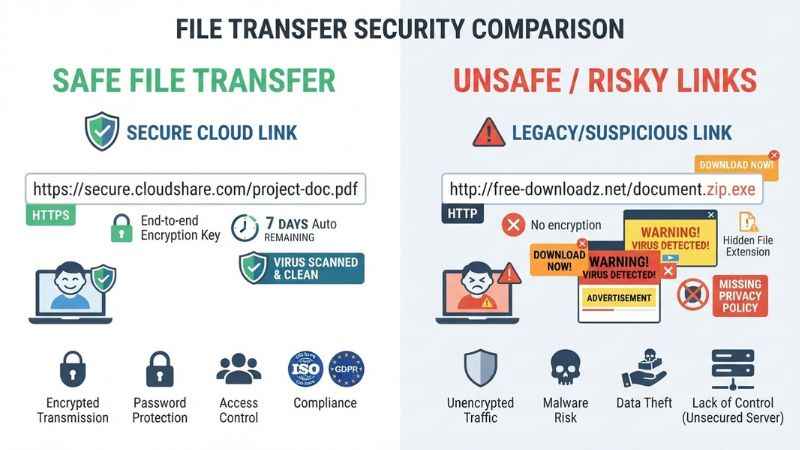
- Check for HTTPS: Check that the URL starts with https:// and that your browser shows no security warning.
- Read the Privacy Policy: Make sure the site states clearly that it will not sell your files or data.
- Look for a DMCA Policy: Safe sites explain how they handle copyright complaints.
- Find Contact Details: Legitimate sites list a real office address or support email.
- Check Security Scores: Run the URL through online safety domain scanners.
- Verify File Expiration: Good temporary transfer sites auto-delete your files after a set number of days.
- Check for Malware Scans: Trustworthy tools scan uploaded files for viruses before generating download links.
- Look for Password Protection: The tool should let you set a password for your file link.
- Review Data Storage Rules: Make sure you know what country holds the data servers.
- Check User Reviews: Search Reddit or tech forums to see if other users report hidden fees or broken links.
Red Flags That Indicate a Risky Site
Close the browser tab right away if you notice any of these warning signs:
- The site forces you to download an
.exefile or browser extension just to open a document. - Pop-up ads hide the real download button.
- The page asks for your credit card details for a “free” file download.
- You receive a countdown clock warning that your computer will lock if you do not click a link.
Copyright and DMCA: What Users Need to Know
Sharing files online carries legal responsibilities. Whether you own a website or send files, you should understand how copyright rules work.
DMCA Safe Harbor Basics
The Digital Millennium Copyright Act (DMCA) is a U.S. law that protects web platforms from being sued if a user uploads stolen content. To stay protected under “Safe Harbor” rules, a site owner must:
- Register a designated agent with the U.S. Copyright Office.
- Take down copyrighted files quickly when an owner sends a complaint.
- Ban users who repeatedly break copyright rules.
Risks of Uploading Copyrighted Material
If you upload movies, paid software, books, or music to public file hosts without permission:
- Your download link may be disabled.
- Your account may be banned.
- In some cases, your internet provider may send a warning.
- In serious cases, copyright owners can take legal action.
How to File a DMCA Takedown Notice
If someone uploads your private file, artwork, or document without your consent, send a takedown notice to the site host with these details:
- A clear link to the copyrighted work you own.
- The exact URL where the stolen file is hosted.
- Your full name, email address, and physical address.
- A statement saying you believe in good faith that the use is unauthorized.
- Your physical or electronic signature.
SEO and Guest Posting: Why FilesXpress.com Has High Moz DA but Low Ahrefs DR
If you work in digital marketing, you might have seen filesxpress.com listed on guest post market sites. You might wonder why its metrics look confusing.
Understanding the Moz DA / Ahrefs DR Discrepancy
It is common for repurposed domains like filesxpress.com to show a high Moz Domain Authority alongside a very low Ahrefs Domain Rating. Here is why that gap exists:
- Old Backlink History: Many websites likely linked to it when it was a file host. Moz typically still counts those old historical links in its index.
- Recent Link Decay: Ahrefs updates its database faster. When the file-sharing service shut down and many file links broke, Ahrefs removed those dead links, dropping the DR metric down.
- Repurposed Domain Effect: SEO tools treat old domains differently when site content changes suddenly from a cloud tool to a general blog.
Guest Posting Opportunities
According to some guest post directories, seller lists offer guest post placements on filesxpress.com because of its old DA score.
Caution for Marketers: Do not spend money buying links on repurposed file-sharing domains with a low Ahrefs DR. Links from low-quality repurposed sites often have little SEO value. Search engines like Google recognize when an old file tool suddenly becomes a low-quality blog network, and spending money here can waste your marketing budget.
Frequently Asked Questions (FAQ)
What is filesxpress.com used for?
FilesXpress.com was originally an online tool for uploading and sharing large files. Today, the owner turned it into a general blog that publishes articles about technology, travel, education, and business.
Is filesxpress.com safe?
Browsing the blog pages on filesxpress.com is generally safe based on general browsing, as no active malware reports were found. However, the old file-sharing tool is no longer active or secure. Do not attempt to upload private files or click suspicious ad links on the site.
Can I still upload files to filesxpress.com?
No, based on testing as of October 2026, you cannot upload files to filesxpress.com anymore. Testing shows that the upload feature is broken and discontinued. Use verified tools like WeTransfer, Dropbox, or Google Drive instead.
What happened to filesxpress.com file sharing?
The original file-sharing service shut down. The domain was subsequently repurposed into a content blog to capture traffic from old web links.
Is filesxpress.com a virus or malware?
FilesXpress.com itself is not a virus. However, broken or unmonitored file sites can sometimes host unsafe ads or broken download buttons. Never download unexpected file attachments or executable programs.
What are the best filesxpress.com alternatives?
The best free alternatives include WeTransfer for quick transfers without an account, Google Drive for large cloud storage, Dropbox for syncing documents, and SendAnywhere for fast code-based sharing.
Does filesxpress.com have a DMCA policy?
FilesXpress.com lists a DMCA Policy page in its site navigation, but specific designated agent details may not be easy to find. See site footer for Privacy Policy, DMCA Policy, and Contact pages if you need to report content.
Who owns filesxpress.com?
General domain privacy settings protect the ownership details of filesxpress.com, hiding the owner’s real name and address from standard public view.
Why does filesxpress.com have high Moz DA but low Ahrefs DR?
Moz keeps old link history from when the site was a busy file-sharing tool, keeping the DA high. Ahrefs clears dead links faster, dropping the DR score after the file service closed down.
Is filesxpress.com a blog or file-sharing site?
FilesXpress.com is currently a general blog. It retains its old domain name, but it no longer offers working file hosting or file transfer services.
Final Verdict: Should You Use FilesXpress.com in 2026?
FilesXpress.com is a repurposed website. While it used to be a file-sharing tool, it now operates only as an informational blog. The file upload features are offline and no longer safe to use based on testing.
If you need to send files today, do not waste time on broken sites. Pick a secure alternative from our list—such as WeTransfer for fast links or Google Drive for secure storage—to keep your personal data safe. Bookmark this guide to check back for security updates and new file-sharing tools!
You May Also Like:
Vortextide.com Review (2026): Guest Post Metrics, Risks, and Safer Alternatives
hidingme com: What It Is, How It Works, and Whether It’s Safe

Joseph Quinn is the founder and editor of Punspa, a technology-focused website covering technology, website reviews, internet terms, and other things worth figuring out online. He writes and edits the site’s technology and web content, with a focus on clear, useful explanations. He also enjoys humor and wordplay, which occasionally leads him to write a pun-related article just for the fun of it.