You can turn your streaming history into a virtual room with the madeonverse.com spotify generator. This tool reads your top artists and tracks to build a digital room that matches your personal taste.
The trend took off on TikTok because users like sharing their music taste as a digital room. If you love music or aesthetic decor, this tool gives you a fun snapshot of your style.
This simple guide shows you how to create your room, customize every detail, fix loading errors, and keep your account safe.
What Is Madeonverse and How Does the Spotify Bedroom Work?
Madeonverse is a web tool made by Discz Music Inc., the company behind the Verse app. It uses smart software to look at your streaming history and map it to specific room items.
The software checks your recent listening history (exact time range not stated by the developer). Users report seeing items like bright colors for pop fans, guitars for indie fans, and band posters on walls.
Your Spotify Data ──► AI Room Engine ──► Custom Visual Bedroom
(Top Songs & Artists)    (Visual Mapper)    (Posters, Decor & Colors)
The app also supports Apple Music, so non-Spotify users can join in. Gen Z listeners love this tool because it works like a personal style check. It turns your daily playlists into a cozy room you can share online.
How to Create Your Spotify Bedroom on Madeonverse (Step-by-Step)
Follow these steps to make your visual bedroom. It usually takes a few minutes.
Step 1: Visit Madeonverse.com
Open your browser and go to madeonverse.com. The .net version (internetbedroom.madeonverse.net) is also linked to the same project, but .com is the main site. Do not use private or incognito mode, as secret tabs often block the login connection.
Step 2: Choose Spotify (or Apple Music)
On the homepage, tap the Connect Spotify button. If you use Apple Music, tap that option instead.
Step 3: Log In and Grant Permissions

Log in with your normal music account details. You will see a Spotify permissions screen. The app requests access to your top artists and tracks and basic profile info.
Safety Note: Spotify requires your permission before sharing any music data with third-party sites.
Step 4: Wait for AI to Generate Your Room
The tool takes a short time (often under a minute) to analyze your top tracks. While you wait, the system picks colors, posters, and furniture that fit your overall music mood.
Step 5: View and Explore Your Generated Bedroom
Once loaded, your new room appears on your screen. Users have reported seeing items like friendship bracelets for Taylor Swift fans, dark decor for Billie Eilish fans, and neon signs for hip-hop fans.
Step 6: Customize Your Room (Optional)
Tap on items like chairs, posters, or wall paint to swap them out. You can change decor items to match your actual bedroom or test different aesthetic vibes.
Step 7: Save and Share Your Bedroom
Click the Save & Share button at the bottom of your screen. You can download the image directly to your phone or copy a share link to post on TikTok, Instagram, or Snapchat.
Privacy and Data: What Madeonverse Accesses from Your Spotify Account
Understanding what third-party apps do with your personal data keeps your account safe.
What Data Does Madeonverse Access?
Madeonverse uses Spotify’s official developer system. It reads specific data points:
| Data Type | Accessed? | Details |
| Top Artists & Tracks | Yes | Reads your top played content via user-top-read scope |
| Basic Profile Info | Yes | Sees basic profile details via user-read-private scope |
| Account Username | Yes | Displays your display name on room visuals |
| Passwords & Payment | NO | Never sees or stores your login password or credit card |
| Private Messages | NO | Has zero access to your private chats or inbox |
WHAT MADEONVERSE SEES:         WHAT MADEONVERSE CANNOT SEE:
[x] Top Songs & Artists       [ ] Passwords
[x] Basic Profile Info        [ ] Credit Card Info
[x] Display Name              [ ] Private Messages
Is Madeonverse Safe to Use?
Yes, the site is safe to use. It uses Spotify’s OAuth login. You do not type your password on madeonverse. The app gets an access token that expires after 1 hour unless refreshed.
How to Remove Madeonverse Access from Spotify
You can remove app access at any time once you finish saving your room image.
- Go to spotify.com/account in any web browser and log in.
- Under Security and Privacy, click Manage Apps.
- Look for Madeonverse or Verse on your list of approved apps.
- Click the Remove Access button next to it.
spotify.com/account ──► Security & Privacy ──► Manage Apps ──► Click "Remove Access"
Once removed, the site can no longer read your music stats unless you log in again.
Customization Tips: How to Make Your Spotify Bedroom More Accurate
If your room does not match your style, you can tweak the items to get a better look.
- Add Specific Artists: Type in extra favorite singers to change your wall posters.
- Adjust Vibe Colors: Pick pastels for indie pop, dark shades for metal, or bright neon for dance music.
- Change Furniture: Swap default chairs, desks, or pets for items that match your real room.
- Mix Up Your Playlists: Listening to new music may change your room over time, but the exact time range is not stated.
Free vs. Paid Items: Generating and sharing your room is free. Some customization items may require payment, but this is not fully confirmed.
Troubleshooting: What to Do If Madeonverse Isn’t Working
If you run into errors while making your room, use these simple fixes.
Common Issues and Fixes
Room Won’t Load or Appears Blank
- Refresh your web browser page.
- Switch from private or incognito mode to a standard browser tab.
- Turn off active ad-blockers or content filters temporarily.
- Clear your browser cache and cookies, then try again.
Spotify Login Fails or Hangs
- Ensure your Spotify account is active.
- Try switching to a desktop computer if you are using a mobile phone.
- Check X (Twitter) or Spotify’s status page to see if servers are offline.
Customization Items Won’t Save
- Close other open tabs to free up phone memory.
- Try a different browser if items won’t save.
- Make sure you are not picking an item that may require payment or is unavailable.
When to Contact Support
If your room still fails to load, check the r/truespotify or r/spotify groups on Reddit. Reddit users sometimes share fixes when the tool has issues.
Madeonverse vs. Alternatives: Other Spotify Bedroom Tools
Madeonverse is not the only web app that turns music history into digital art. Here is how it compares to other options like internetbedroom.com.
Top Alternatives
- internetbedroom.com: A popular option that lets you visualize your listening habits into a digital bedroom.
- Other music visualizers: Various third-party web apps offer similar ways to display your music taste visually.
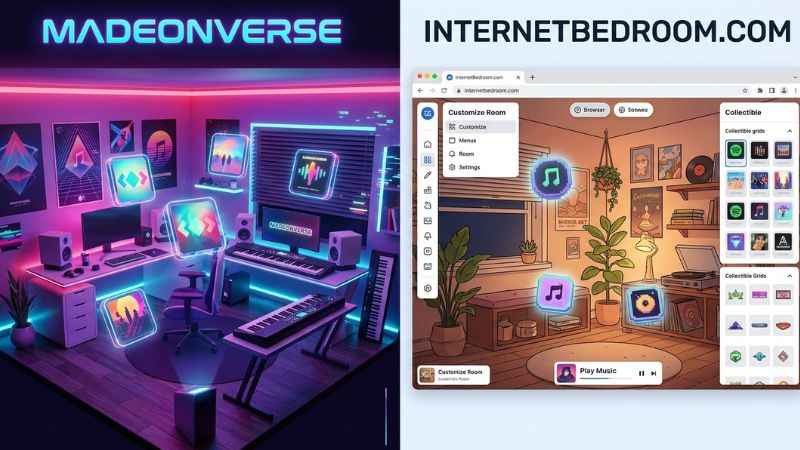
Comparison Table
| Feature | Madeonverse | internetbedroom.com |
| Spotify Support | Yes | Yes |
| Apple Music Support | Yes | Yes |
| Customization Level | High | Medium |
| Cost | Core features free (paid options unclear) | Core features free |
| Revoke Access Support | Yes | Yes |
Common Mistakes to Avoid When Using Madeonverse
- Using Incognito Mode: Secret tabs often block the security handshake needed to link your account.
- Picking the Wrong Music App: Make sure you tap Spotify if you use Spotify, or Apple Music if you use Apple Music.
- Forgetting to Revoke Access: Clean up your connected apps list regularly to keep your account secure.
- Sharing Passwords: Madeonverse will never ask for your password directly. If a site asks for your password, close it immediately.
FAQ: Madeonverse Spotify Bedroom Questions Answered
What is Madeonverse?
Madeonverse is a web app made by Discz Music Inc., the company behind the Verse app. It reads your music streaming history to generate a digital room filled with decor, posters, and colors that reflect your music taste.
Is madeonverse.com safe to use?
Yes, madeonverse.com is safe. It uses official Spotify permission systems, meaning it never sees your password and only reads basic listening stats.
What data does Madeonverse access from Spotify?
It accesses your top artists and most played tracks. Playlist access is not confirmed. It cannot read your private messages, passwords, or payment details.
How do I remove Madeonverse access from Spotify?
Log into [spotify.com/account](https://spotify.com/account), go to Manage Apps under Security and Privacy, find Madeonverse on the list, and click Remove Access.
Can I use Apple Music instead of Spotify?
Yes, Madeonverse works with both Spotify and Apple Music accounts.
Why is my Spotify bedroom not loading?
Blank screens can happen for several reasons, including private browsing, ad-blockers, or server issues. Switch to a standard browser tab and refresh the page.
Madeonverse vs. internetbedroom.com – which is better?
Both support Apple Music. Art style and feature differences vary depending on user preference.
Is Madeonverse free to use?
Generating and sharing your room is free. Paid options are unclear.
The Cultural Context: Why the Spotify Bedroom Trend Went Viral
The Spotify bedroom trend exploded on TikTok and Instagram because Gen Z treats music as a primary form of self-expression. Just like showing off a physical room, sharing a digital room tells friends what you listen to in a quick, visual way.
This trend is similar to Spotify Wrapped in spirit. Some link it to “bedroom pop” culture, but this is not officially confirmed. It lets music fans turn personal audio habits into a creative artwork they can display online.
You May Also Like:
Heartymag.com Review: Is It Safe for Guest Posts & Backlinks?
How Much Mogothrow77 Software Is Open Source? (Evidence-Based Answer)

Joseph Quinn is the founder and editor of Punspa, a technology-focused website covering technology, website reviews, internet terms, and other things worth figuring out online. He writes and edits the site’s technology and web content, with a focus on clear, useful explanations. He also enjoys humor and wordplay, which occasionally leads him to write a pun-related article just for the fun of it.