What is monday.com? It is a cloud-based work management platform designed to help teams run projects, track daily processes, manage sales pipelines, and handle customer service tickets in one visual space. Instead of using separate spreadsheets, email chains, and disconnected chat tools, teams build custom boards to track every piece of work from start to finish.
If you want a flexible, visual system to handle business operations, monday.com is one of the best tools available. However, if you only need a basic personal task list, or if you want a platform built solely for deep software engineering, it may offer more complexity than you need. You can learn more or log in directly on the official monday.com website, check the official monday.com login page, or review their official pricing page.
monday.com at a Glance
For a quick evaluation, this summary highlights what the platform offers, who uses it, and how it works:
| Question | Short Answer |
| What is it? | A customizable work platform for managing workflows and daily operations. |
| Who uses it? | Project, marketing, operations, sales, service, product, HR, and agency teams. |
| Main building block | A board made of items, groups, columns, assignees, statuses, and dates. |
| Main strengths | Flexible layouts, visual planning, built-in automations, and cross-team dashboards. |
| Main tradeoff | Requires initial setup time and team guidelines to avoid messy boards. |
| Free option | monday Work Management offers a Free plan for up to two users, with significant board and item limits. |
| Paid pricing | Starts at $9 per seat per month (billed annually), with higher tiers for advanced tools. Pricing checked September 24, 2026. |
How monday.com Works
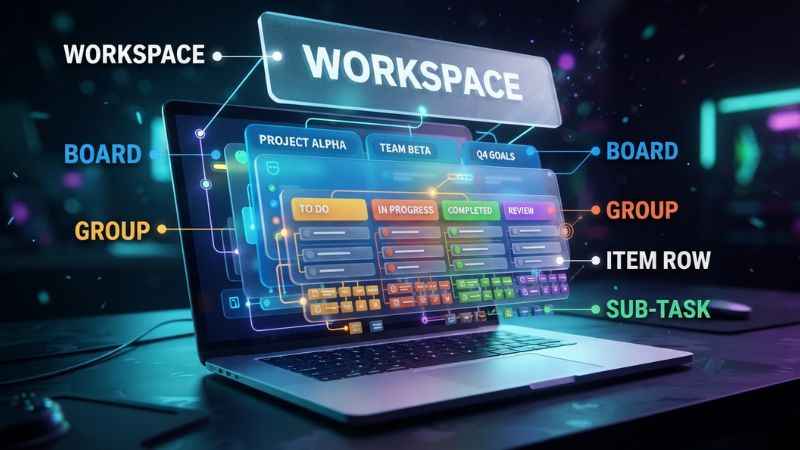
At its core, monday.com turns work data into a visual table called a board. Every workflow uses the same basic structure, which you can adjust using custom columns and visual layouts.
Workspace: Marketing Team
- Board: Q1 Campaign Launch
- Group 1: Design Phase
- Item: Draft Social Graphics
- Subitem: Export PNGs
- Item: Review Copy
- Group Metadata/Columns:
People: Sarah|Status: In Progress|Due: Oct 12
- Item: Draft Social Graphics
- Group 2: Launch Phase (Currently empty)
- Group 1: Design Phase
Boards, Workspaces, Groups, and Items
Understanding the core hierarchy helps you set up your first process correctly:
- Workspace: The top-level folder that holds related boards, dashboards, and team members.
- Board: The main canvas where you track a specific project or process.
- Group: A section inside a board used to break work into phases, months, or stages.
- Item: A single row representing a task, client, project, or record.
- Subitem: A smaller task nested directly inside an item.
- Column: A field attached to an item, such as a status label, file upload, text note, or date.
- People Column / Assignee: The specific person assigned to complete an item via a People column.
- Status: A colored label (like “Done,” “Working on it,” or “Stuck”) showing current progress.
- Dependency: A rule linking related items that can coordinate their dates and sequencing.
- Updates Section: A built-in chat panel attached to each item for notes and files.
Views for Different Work Styles
You can look at the same board in several distinct visual formats depending on your needs:
- Table View: The default grid view that works like a visual spreadsheet.
- Kanban View: Displays items as cards arranged in columns by status. Great for moving work through stages.
- Timeline and Gantt Views: Shows tasks across a calendar bar to track schedules, overlapping dates, and project milestones. Gantt is available on eligible paid plans, while some advanced Gantt features require Pro or Enterprise.
- Calendar View: Displays items on a traditional monthly or weekly calendar.
- Workload View: Shows how many tasks each team member has assigned to prevent burnout on eligible Pro and Enterprise plans.
- Dashboard: Combines charts and summary widgets from multiple connected boards into a single high-level report.
A Practical Example: Marketing Campaign Workflow
Here is how a standard marketing campaign moves through a monday.com board:
| Step | Task Item | Status | Assignee | Due Date | Triggered Automation |
| 1 | Campaign Brief | Brief Received | Product Lead | Oct 1 | Sends email notification to Marketing Lead. |
| 2 | Content Draft | Working on it | Copywriter | Oct 5 | None. |
| 3 | Asset Review | Review Pending | Creative Director | Oct 8 | Moves item to the “Approvals” group. |
| 4 | Final Launch | Approved | Marketing Lead | Oct 10 | Changes status to “Ready to Publish.” |
| 5 | Performance | Published | Data Analyst | Oct 15 | Creates a follow-up task to record results. |
What Can You Use monday.com For?
Teams across different departments adapt monday.com to fit their daily tasks and operational goals.
| Team or Use Case | Typical Workflow | Useful monday.com Capability |
| Project Management | Project plans, task assignments, budget tracking | Timeline views, dependencies, milestones |
| Marketing | Content calendars, campaign launches, ad requests | Forms for intake, calendar views, image proofing |
| Operations | Equipment requests, vendor management, approvals | Custom status columns, cross-board updates |
| Sales | Lead tracking, account management, pipeline tracking | monday CRM, deal stages, activity logs |
| Customer Service | Support tickets, bug reports, client onboarding | monday Service, SLA tracking, automated routing |
| Software Dev | Sprint planning, bug fixes, feature roadmaps | monday dev, agile boards, GitHub integrations |
| Human Resources | Applicant tracking, new hire onboarding, reviews | Form templates, private boards, permissions |
| Agencies | Client deliverables, tracking time, project reviews | Guest access, shared dashboards, Time Tracking Column (on eligible Pro/Enterprise plans) |
Best Fit by Team Size
- Individual or Freelancer: Works well for managing personal tasks and client deadlines, though simple apps may be faster to set up.
- Small Team (3–10 seats): Excellent for centralizing task lists, sharing updates, and eliminating long status emails.
- Growing Department (10–50 seats): Ideal for tracking workload distribution, automating handoffs, and reporting to management.
- Multi-Department Organization: Highly effective for bridging communication gaps between sales, marketing, and product teams.
- Enterprise: Strong choice for large organizations needing strict permissions, single sign-on (SSO), and audited compliance.
monday.com Products: Which One Do You Need?
monday.com offers specialized product suites built on top of its core infrastructure. Choosing the right product ensures you get pre-built features tailored to your industry.
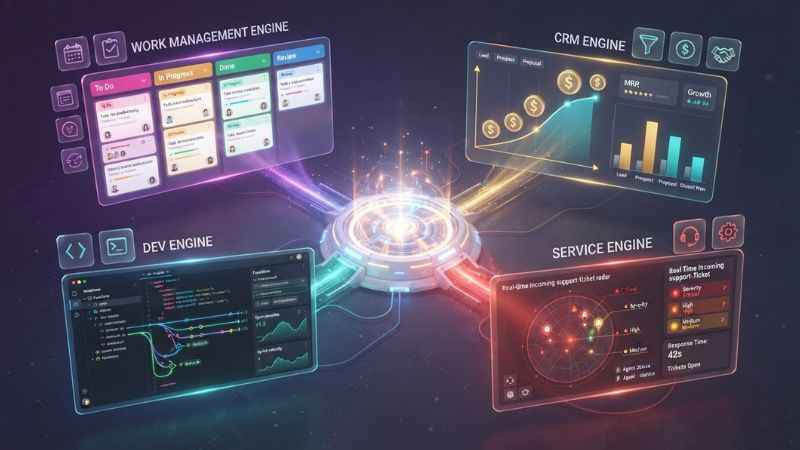
monday.com Platform
│
┌────────────────┬───────────┴───────────┬────────────────┐
▼                ▼                       ▼                ▼
monday Work Management monday CRM          monday dev     monday Service
(Core Projects)       (Sales Pipelines)  (Agile Sprints) (Support Tickets)
- monday Work Management: The core platform designed for general project management, campaign tracking, and daily business operations. Choose this if you need flexible workflow planning across various teams.
- monday CRM: Built specifically for sales teams to track leads, deal stages, client communications, and sales forecasting. Choose this if you want a dedicated sales pipeline that connects directly with project boards.
- monday dev: Tailored for product and engineering teams managing sprints, bug tracking, and product roadmaps, supporting development workflows and integrating with tools such as GitHub and GitLab. Choose this if you run agile software development.
- monday Service: Designed for IT and service desk teams to handle incoming support tickets, customer requests, and service level agreements (SLAs). Choose this if you run a structured help desk.
Selecting the wrong product can lead to confusion. For example, buying monday dev when you only need a basic marketing calendar adds extra agile tools that your team will not use.
monday.com Features That Matter Most
Automations
Automations save time by handling routine operational tasks automatically. They follow a simple “When this happens, do that” structure. Common examples include:
- When a status changes to “Done,” notify the project manager.
- When a new item is created, assign it to a team member and set a due date for three days later.
- When a date arrives, move the item to the “In Progress” group.
Note: Automation access and monthly action limits depend directly on your subscription tier. Native automations begin on eligible paid plans.
Integrations
Integrations connect monday.com with external software to sync data seamlessly across your organization:
- Communication: Slack, Microsoft Teams, Zoom
- Productivity: Gmail, Google Calendar, Google Sheets
- Sales & Finance: Salesforce, HubSpot, QuickBooks
An integration syncs data between monday.com and an external tool (like importing an email as a new item). An automation takes an action inside monday.com itself (like changing a status label when a date passes).
Dashboards and Reporting
Dashboards bring together summary widgets from multiple connected boards to give managers clear oversight. You can build line charts, bar graphs, numbers widgets, and workload indicators. This gives executives high-level visibility without requiring them to check individual task lists. However, dashboards depend entirely on accurate source data. If team members fail to update their task statuses, dashboard reports will be inaccurate.
AI Capabilities
The platform includes built-in AI tools designed to speed up daily work, such as AI assistants, agents, and automated workflow options. Specific AI capabilities, features, and rollout statuses vary, and usage may be subject to account-specific limits or plan restrictions. Check your account settings and official product documentation for current availability.
monday.com Pricing and Free Plan
For the applicable Work Management paid plans, monday.com may bill using a minimum seat requirement (such as a 3-seat minimum on standard plans); confirm the current seat rules on the official pricing page. A Free plan exists for up to two users, along with a 14-day free trial for paid products that requires no credit card.
| Plan | Billed Annually (Per Seat/Mo) | Best For | Key Capabilities & Limits |
| Free | $0 | Up to 2 users needing basic task tracking | Up to 2 users, up to 200 items across up to 3 main boards. |
| Basic | $0 (Check live pricing) | Small teams organizing simple work | Simple team management, core task tracking features. |
| Standard | $12 | Growing teams tracking timelines | Timeline/Gantt views, Calendar view, Guest access, 250 automation actions and 250 integration actions per month. |
| Pro | $19 | Advanced workflows and workload tracking | Private boards, Chart views, Time tracking, Formula column, 25,000 automation actions and 25,000 integration actions per month. |
| Enterprise | Custom Quote | Large companies needing tight security | Enterprise security, audit logs, single sign-on (SSO), tailored onboarding, highest action limits. |
Pricing checked September 24, 2026. Check the official pricing page immediately before purchasing.
What the Headline Price Does Not Tell You
When budgeting for monday.com, keep these factors in mind:
- Seat Minimums: Applicable Work Management plans bill based on minimum seat increments (e.g., 3 seats minimum). Confirm exact seat rules on the pricing page for your target plan.
- Billing Cycles: Monthly billing costs roughly 20% to 25% more than annual rates.
- Action Limits: Automations and integrations consume actions. Action overages can affect the following month’s allocation, so high-volume workflows should be monitored.
- Product Differences: Pricing tiers for monday CRM, monday dev, and monday Service differ from standard Work Management rates.
Total-Cost Scenarios (Annual Billing)
- 3-Seat Team on Standard Plan: 3 seats × $12 = $36 per month (billed as $432 per year).
- 5-Seat Team on Pro Plan: 5 seats × $19 = $95 per month (billed as $1,140 per year).
- 10-Seat Team on Standard Plan: 10 seats × $12 = $120 per month (billed as $1,440 per year).
Is monday.com Easy to Use?
Editorial testing and user feedback frequently highlight monday.com’s colorful interface and clear drag-and-drop mechanics. Many teams find that new members can quickly learn how to check off tasks, change status colors, and leave comments.
However, because the platform is so flexible, setting up large workspaces can quickly become confusing. Without standardized column names or clear templates, teams risk creating messy, overlapping boards.
5-Step Beginner Setup Checklist
- Map Your Process: Draw your workflow steps on paper before opening the software.
- Start with One Board: Pick a single project or daily process to test first.
- Set Up Core Columns: Add columns for People/Assignee, Status, and Due Date.
- Add One Automation: Create a simple rule, like notifying a teammate when a status changes to “Done.”
- Review After Two Weeks: Gather team feedback and adjust columns before building more boards.
monday.com Pros and Cons
| Strengths | Limitations |
| Highly customizable layouts fit almost any business process. | Heavy customization can lead to inconsistent board structures. |
| Visual views like Gantt, Kanban, and Workload are clear and responsive. | Gantt is available on eligible paid plans, while some advanced Gantt features require Pro or Enterprise. Workload requires eligible Pro/Enterprise plans. |
| Built-in automations eliminate manual steps and status checks. | 250 automation/integration actions per month on Standard can be reached quickly by high-volume teams. |
| Executive dashboards aggregate updates across multiple departments. | Reports become inaccurate if users do not update their boards regularly. |
| Dedicated product suites (CRM, dev, Service) target specific industries. | Choosing between different products can confuse new buyers. |
monday.com Compared with Alternatives
Plaintext
WORKFLOW FLEXIBILITY vs. FOCUS
High Flexibility
│
│    [Notion]               [monday.com]
│    (Docs & Databases)     (Visual Operations)
│
│                           [ClickUp]
│                           (All-in-One Features)
│
│    [Trello]               [Asana]
│    (Simple Kanban)        (Structured Projects)
│
└───────────────────────────────────────────────────── Specialized Focus
[Jira] (Software Sprints)
The following comparisons reflect general editorial assessments based on feature testing and published tier structures:
| Alternative | Consider It When… | monday.com May Be Stronger When… |
| Asana | You prefer a structured task layout with dedicated goal-tracking frameworks. | You need more visual customization, flexible columns, and custom board building blocks. |
| ClickUp | You want an all-in-one platform with extensive feature density and competitive entry pricing. | You prefer a visual layout that teams often find straightforward to navigate. |
| Trello | You only need simple, lightweight Kanban card boards for basic lists. | You need advanced timelines, formula columns, and executive reporting across multiple projects. |
| Jira | Your primary focus is technical software bug tracking and deep developer issue management. | You manage non-technical business teams like marketing, sales, and operations alongside product teams. |
| Notion | You want a document-first workspace combining wikis, notes, and light project tables. | You require structured operational workflows, formal project tracking, and heavy automation rules. |
| Smartsheet | Your team prefers standard, spreadsheet-focused grid planning with advanced financial formulas. | You want a modern visual interface with drag-and-drop tools for team adoption. |
Security, Privacy, and Enterprise Readiness
For enterprise buyers, monday.com offers administrative and governance tools to keep company data safe, including granular permissions, two-factor authentication (2FA), single sign-on (SSO), and IP restrictions on applicable tiers.
According to official documentation in the monday.com Trust Center, the platform maintains several industry security standards and certifications:
- Security Audits: SOC 1 Type II, SOC 2 Type II, SOC 3
- ISO Certifications: ISO 27001, ISO 27017, ISO 27018, ISO 27701
- Privacy & Compliance: GDPR and CCPA compliance programs. monday.com’s Trust Center lists HIPAA among its compliance programs; enterprise buyers should verify current scope, eligibility, and contractual requirements directly with monday.com.
Enterprise buyers should review these certificates and documentation directly with monday.com to confirm that specific legal requirements are met for their region and industry.
Common monday.com Mistakes and Implementation Tips
Avoid these frequent mistakes when setting up your workspace:
- Building Too Many Boards: Do not create a separate board for every minor task. Group related work onto a single master board using groups.
- Inconsistent Status Labels: Avoid using labels like “Complete” on one board and “Finished” on another. Keep names consistent across teams.
- Assigning Multiple Assignees: Avoid placing multiple people in a single assignee column without clear rules. Assign one primary owner so accountability remains clear.
- Automating Broken Processes: Fix broken or confusing operational steps on paper before building rules inside software.
- Ignoring Inactive Users: Leaving old project boards open dilutes search results. Archive completed boards every quarter.
Practical Governance Checklist
- [ ] Draft one standard naming convention for all team workspaces and boards.
- [ ] Assign one dedicated board owner to review board health every month.
- [ ] Document official templates for recurring projects.
- [ ] Review monthly automation and integration action limits regularly.
- [ ] Audit user access rights and guest permissions every quarter.
How to Decide Whether monday.com Is Right for You
Choose monday.com if:
- You manage projects across different departments that need clear, visual tracking.
- You want to automate routine status updates and handoffs without writing custom code.
- You need executive dashboards to report on high-level goals across multiple teams.
- You want flexible building blocks that can adapt to marketing, operations, or HR needs.
Consider an alternative tool if:
- You only need a simple checklist for personal daily tasks.
- You want a document-centric notebook space rather than structured project boards.
- Your engineering team requires deep, technical issue tracking out of the box.
- You cannot dedicate time to standardizing board templates and administrative controls.
Frequently Asked Questions
What is monday.com used for?
monday.com is used for managing work processes, tracking project tasks, running marketing campaigns, tracking sales leads, and organizing daily operations across teams.
Is monday.com free?
Yes. monday Work Management offers a Free plan for up to two users with up to 200 items across three main boards, as well as a 14-day free trial for paid plans that requires no credit card.
How much does monday.com cost?
Paid plans for monday Work Management starting tiers typically run from $9 per seat per month (billed annually, with applicable seat minimums). Higher tiers like Standard and Pro run $12 and $19 per seat per month. Check the live pricing page to confirm rates (Pricing checked September 24, 2026).
Does monday.com have a free trial?
Yes. According to official monday.com documentation, a 14-day free trial is available for paid plans without requiring a credit card.
Is monday.com good for project management?
Yes. It provides Gantt charts on eligible paid plans, timeline views, resource workload maps on Pro/Enterprise, dependencies, and automated alerts, making it a versatile platform for project managers.
Does monday.com have a mobile app?
Yes. monday.com offers official mobile apps for iOS and Android so users can check updates, change statuses, and comment on tasks on the go.
Can monday.com replace Excel or spreadsheets?
Yes. It replaces static spreadsheets by adding real-time tracking, file sharing, automated notifications, visual views, and interactive status changes.
Is monday.com secure?
Yes. monday.com supports security features like granular permissions, 2FA, SSO, and maintains certifications including SOC 2 Type II and ISO 27001.
What is the difference between monday Work Management and monday CRM?
monday Work Management is built for general projects and daily processes. monday CRM is specifically designed to manage sales pipelines, lead captures, and account deals.
What are the best monday.com alternatives?
Top alternatives include Asana for structured task management, ClickUp for feature density, Trello for simple Kanban boards, Jira for software bugs, and Smartsheet for spreadsheet layouts.
Next Steps
To evaluate whether monday.com fits your business workflows, start by opening a 14-day free trial on the official monday.com website. Build a single board for an active project, invite two team members, and run your daily updates through the board for one week before rolling it out across your organization.
You May Also Like:
Tylurs.com Explained: Primary Domain, Topics, Legitimacy, and Related Domains
SimplifyDiggs.com Review: What It Is, Whether It’s Safe, and How Trustworthy It Really Is

Joseph Quinn is the founder and editor of Punspa, a technology-focused website covering technology, website reviews, internet terms, and other things worth figuring out online. He writes and edits the site’s technology and web content, with a focus on clear, useful explanations. He also enjoys humor and wordplay, which occasionally leads him to write a pun-related article just for the fun of it.