The PFMS (Public Financial Management System) is an online portal managed by the Indian government to track and transfer welfare money directly into bank accounts. If you are waiting for a scholarship, pension, or scheme payment like PM-KISAN, this system handles your money.
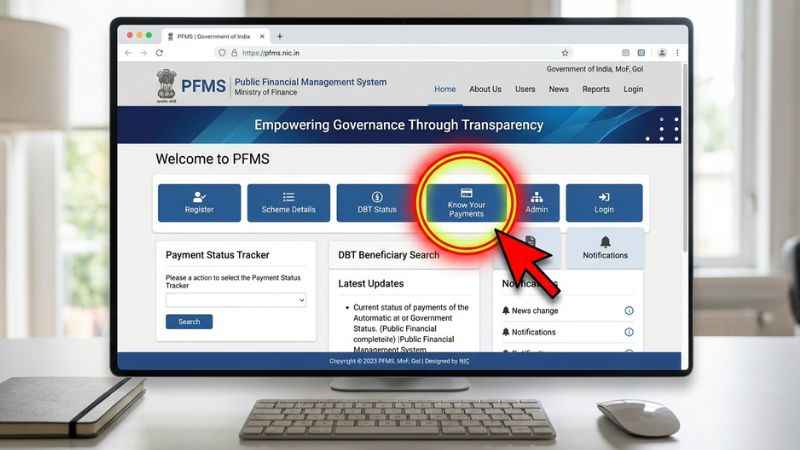
To check your status right now, go to pfms.nic.in, click on Know Your Payments, enter your bank name and account number, complete the captcha, and verify with the OTP sent to your registered mobile number to view your transaction details.
What Is PFMS and Who Operates It?
The Public Financial Management System is an end-to-end digital network for tracking government funds. It is owned and operated by the Controller General of Accounts (CGA), which works under the Department of Expenditure in the Ministry of Finance.
| System Level | Entity / Actor | Role & Purpose in Payment Flow |
| Stage 1: Origin | Central / State Government | Allocates budgets and releases official welfare/project funds. |
| Stage 2: Processing | PFMS Main Portal | Central digital hub that verifies, tracks, and routes transactions. |
| Stage 3: Disbursement | Direct Beneficiary | Citizens, students, and farmers receiving direct benefit transfers (Scholarships, Pensions, PM-KISAN). |
| Stage 3: Disbursement | Registered Agencies | Vendors, contractors, and Drawing & Disbursing Officers (DDOs) receiving project and invoice payments. |
The system connects the central government, state governments, commercial banks, and individual beneficiaries. Its primary job is to power Direct Benefit Transfer (DBT). This ensures welfare money reaches citizens without middleman leaks or delays.
| User Type | What They Use the Portal For | Major Welfare Schemes |
| Citizens & Farmers | Track subsidies, pensions, and income support. | PM-KISAN, MGNREGA, PMAY |
| Students | Check college and school financial aid disbursement. | NSP Scholarships, CSIS |
| Agencies & Vendors | Submit e-Bills, receive project funds, track payments. | State & Central Govt Contracts |
How to Check Your PFMS Payment (DBT) Status — Step-by-Step
Checking your payment status requires no login credentials for general public searches. Have your bank account details or official application ID ready before starting.
| Workflow Step | Action Required | Details & Input Options |
|---|---|---|
| Step 1: Access Portal | Visit Official Website | Go to pfms.nic.in on your web or mobile browser. |
| Step 2: Select Method | Choose Tracking Option | Select either Bank Account + Name or Token / Application ID. |
| Step 3: Verification | Solve Captcha & Submit | Enter the security word verification code and verify with OTP. |
| Step 4: View Output | Check Payment Status | View your transaction result table showing scheme details and credit status. |
By Bank Account Number
- Open the official website at pfms.nic.in.
- Click on the Know Your Payments button on the homepage.
- Type the first few letters of your bank name and select it from the drop-down list.
- Enter your bank account number and re-enter it to confirm.
- Type the word verification (captcha) shown on the screen.
- Click Send OTP on Registered Mobile Number.
- Enter the OTP sent to your phone to view your payment table.
By Aadhaar Number
To track Aadhaar-based DBT payments or check your Aadhaar-NPCI seeding status, you can check through the NPCI BASE portal or individual scheme portals. The main public payment search on PFMS is primarily bank account-based.
By Token or Reference Number
You can check scheme-specific progress using dedicated tracking tools available on the portal.
- Choose your scheme (such as NSP or PM-KISAN).
- Select Application ID or Enter Token Number where applicable.
- Type the exact reference string given on your scheme receipt.
- Enter the captcha and click Search.
The result table displays transaction-wise payment details, which may include benefit amounts, dates, and account processing stages depending on the scheme integration.
PFMS Payment Status Codes: What “Failed,” “Rejected,” and “Pending” Mean
When you check your record, the portal displays a specific status message. Understanding these status codes helps you identify the issue and take immediate corrective action.
| Status String | Plain-Language Meaning | Primary Reason | Exact Fix |
| Sent to PFMS | The scheme department uploaded your file, but processing has not started. | File queued in the central system. | Wait 2 to 4 working days for processing. |
| Pending at Bank | PFMS released funds, but your bank is validating the credit. | System traffic or weekend clearing delay. | Wait 24 to 48 hours; contact your home branch if stuck longer. |
| Payment Failed | The money reached the bank but was returned. | Dormant account, wrong account number, or invalid IFSC. | Update bank account details with the scheme department. |
| Rejected Status Messages | System rejected the file during processing. | Aadhaar not mapped to NPCI mapper or name mismatch. | Complete Aadhaar-NPCI seeding at your bank branch. |
| Approved / Success | Money was processed and sent to your account. | Successful credit transaction. | Update your bank passbook or check your account balance. |
Why PFMS Payments Fail or Get Rejected — And How to Fix Them
Payment failures usually occur due to banking errors, unlinked Aadhaar records, or incomplete paperwork at the department level.
| Failure Cause | Root Issue | Exact Action Required |
| Aadhaar-NPCI Unlinked | Aadhaar is not mapped to the NPCI mapper for DBT transfers. | Complete and submit an NPCI Seeding Form at your home bank branch. |
| IFSC Code Mismatch | Invalid or outdated bank branch code (e.g., due to a bank merger). | Submit an updated Bank Passbook copy with the correct IFSC to the scheme office. |
| Account Inactive / Dormant | Bank account is blocked or inactive due to a lack of recent transactions. | Complete a fresh Re-KYC process at your bank branch to reactivate the account. |
Aadhaar-NPCI Seeding Issues (“UID is disable for DBT”)
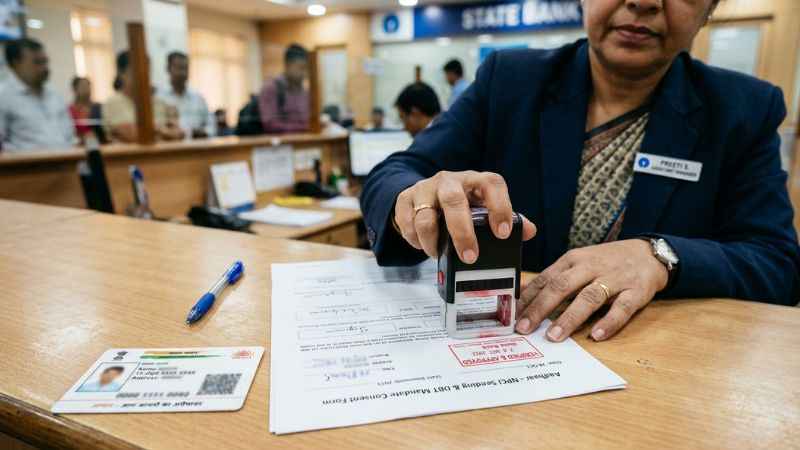
- The Problem: Your Aadhaar card may be linked to your bank for identity (KYC), but it is not linked to the NPCI (National Payments Corporation of India) mapper for receiving direct benefits.
- The Fix: Visit your bank branch in person. Request an Aadhaar-NPCI Seeding Form (also called a DBT Mandate Form). Fill it out, attach a copy of your Aadhaar card, and submit it. Verification usually takes 3 to 7 working days.
IFSC Mismatches and Inactive Accounts
- The Problem: If your bank merged with another institution, your old IFSC code may no longer work. Payments also fail if your account has been inactive or marked dormant due to lack of use.
- The Fix: Submit a updated passbook copy showing your new IFSC code to your local scheme officer. If your account is dormant, complete a fresh KYC process at your bank branch by depositing or withdrawing a small amount.
Scheme-Side Holds and Sanction Delays
- The Problem: Your file shows “Approved,” but the status does not move to “Payment Initiated.” This occurs when the government department has not released the financial sanction order or funding allocation.
- The Fix: This is an administrative delay rather than a personal banking error. Contact your local scheme officer or district welfare office to check sanction release dates.
Students: How to Track NSP Scholarship Payments on PFMS
Students applying for scholarships via the National Scholarship Portal (NSP) can track their funds through a dedicated portal link.
| Stage | Step Name | Process Description |
| Stage 1 | Fill NSP Application | The student submits the scholarship application form online via the National Scholarship Portal. |
| Stage 2 | Department Verifies File | School/college institutes and state nodal officers review and approve the student’s eligibility and documents. |
| Stage 3 | Sent to PFMS Tracker | Approved application details are forwarded to the PFMS portal for fund generation and transaction queuing. |
| Stage 4 | Cash Sent to Bank | PFMS releases the funds directly into the student’s Aadhaar-seeded bank account via Direct Benefit Transfer. |
- Open pfms.nic.in and click on Track NSP Payments.
- Log in using your designated User ID and Password credentials.
- Access your student portal dashboard.
- View your scholarship disbursement status.
IMPORTANT DISTINCTION
NSP Portal Status: Shows application approval, institute verification, and merit list placement.
PFMS Status: Shows money movement, token generation, bank clearance, and final credit dates.
If the NSP tracker states Payment File Rejected, visit your college administration office or the district scholarship department immediately to update your banking records.
Agencies, DDOs, and Vendors: Registration and e-Bill Module
Government agencies, Drawing and Disbursing Officers (DDOs), and commercial vendors must register on the platform to receive or distribute public funds.
Who Must Register
- Agencies: NGOs, autonomous bodies, and local authorities managing government grants.
- DDOs: Government officials authorized to draw funds and clear bills.
- Vendors: Contractors and suppliers providing goods or services to government departments.
Registration Requirements
- Valid PAN card details.
- Active official bank account details with branch IFSC code.
- Official organization email ID and mobile number for OTP verification.
- Agency registration certificate or official appointment letter.
The e-Bill System and Post-Audit Workflow
The system uses an e-Bill module to eliminate physical paper processing. DDOs submit digital bills signed using digital signature certificates (DSC).
In accordance with CGA Orders (Order No 300-01 and Order No Q-18001/2/2026-IAD-CGA), the platform incorporates internal audit users of Ministries and Departments in PFMS for the post-check of e-Bills to streamline auditing after bill processing.
PFMS vs DBT vs IFMS: Clearing the Confusion
These financial terms are often used together, but they refer to different systems:
┌──────────────────────────────────────────────────────────────────────────┐
│  Direct Benefit Transfer (DBT)  ──►  The Overall Policy / Concept        │
│  PFMS Platform                 ──►  Central Govt Processing Software    │
│  State IFMS Systems            ──►  State Govt Processing Software      │
└──────────────────────────────────────────────────────────────────────────┘
- DBT (Direct Benefit Transfer): The overall policy approach of transferring government welfare money directly to citizens’ bank accounts.
- PFMS: The central digital platform built by the central government to process, track, and execute those DBT payments across India.
- IFMS (Integrated Financial Management System): State-specific financial portals (such as e-Kuber or state treasury sites) that manage internal state budgets. In many states, IFMS platforms send data directly to the central system to clear payments.
Official Helpdesk, Grievance, and Escalation Paths
If your payment remains stuck after updating your bank details, use these official channels to resolve the issue:
- Toll-Free Helpline: 1800-118-111
- Official Helpdesk Email: [email protected]
- Official Portal: pfms.nic.in
- Address: Controller General of Accounts, Ministry of Finance, Department of Expenditure, New Delhi.
Escalation Steps
- Step 1: Contact your local bank branch to clear any Aadhaar-NPCI seeding or KYC holds.
- Step 2: Contact your district scheme officer (for NSP, PM-KISAN, or state pensions) if your payment status reads “Rejected by Scheme.”
- Step 3: Lodge a ticket on the official portal under the Grievances tab.
What’s New in PFMS in 2026?
The platform receives regular updates from the Ministry of Finance to streamline processing times and strengthen security.
- Expanded e-Bill Post-Audit: As mandated by CGA orders, internal audit users conduct post-checks of e-Bills across Ministries and Departments.
- Dedicated Internal Audit IDs: System updates require separate, unique audit user IDs for department reviewers to improve tracking and audit compliance.
- Mobile App Functionality: The mobile application provides information about Bank Related KPIs with respect to the Public Financial Management System.
- Aadhaar Mapping Integration: Ongoing technical updates aim to streamline synchronization with banking databases and reduces DBT payment rejections.
FAQs: PFMS Payment Status, Aadhaar Search, NSP, Helpdesk
What does PFMS stand for and who runs it?
PFMS stands for Public Financial Management System. It is managed by the Controller General of Accounts (CGA), Department of Expenditure, under the Ministry of Finance, Government of India.
How do I check PFMS DBT status by bank account?
Visit pfms.nic.in, click on “Know Your Payments,” select your bank name, type your account number, enter the captcha, and verify with the OTP sent to your registered mobile phone.
Can I check PFMS status by Aadhaar? How?
The main public search on PFMS is bank account-based. To check your Aadhaar-based DBT status or seeding, you can use the NPCI BASE portal or your specific welfare scheme’s portal.
Why is my payment “Failed/Rejected,” and what should I do first?
Payments fail due to inactive bank accounts, incorrect IFSC details, or unlinked Aadhaar records. Your first step should be visiting your home bank branch to check your account status and complete Aadhaar-NPCI seeding.
What does “UID is disable for DBT” mean and how do I fix it?
This message means your Aadhaar card is not properly mapped to the NPCI database at your bank. Visit your bank branch in person and submit a written Aadhaar-NPCI seeding form to fix the issue.
How do students track NSP scholarship payments on PFMS?
Go to the homepage, click “Track NSP Payments,” log in using your User ID and Password, and view your scholarship disbursement status on your dashboard.
What is the PFMS helpdesk number and how do I raise a grievance?
You can call the official helpline at 1800-118-111 or email [email protected]. You can also file a complaint directly on the official website under the Grievance tab.
Is there a new PFMS portal in 2026? What changed?
The primary address remains pfms.nic.in. Recent upgrades include the implementation of internal audit users for post-check of e-Bills per CGA orders and enhanced administration features.
Quick Troubleshooting Checklist Before You Contact Support
Run through this quick verification checklist before contacting the helpdesk:
- [ ] Is your bank account active and free of transaction limits?
- [ ] Is your Aadhaar card linked to your bank account via NPCI seeding?
- [ ] Did you enter the correct bank account number without extra spaces?
- [ ] Has your bank branch changed its IFSC code due to a recent merger?
- [ ] Does your registered name on your scheme document match your bank account name?
- [ ] Is your current mobile number linked to your bank account to receive OTPs?
Checking these details beforehand will help resolve most payment processing issues.
You May Also Like:
PMG Meaning: The Complete Context Guide (2026)
DTM Meaning: What It Means in Texting, Slang, and Other Contexts

Joseph Quinn is the founder and editor of Punspa, a technology-focused website covering technology, website reviews, internet terms, and other things worth figuring out online. He writes and edits the site’s technology and web content, with a focus on clear, useful explanations. He also enjoys humor and wordplay, which occasionally leads him to write a pun-related article just for the fun of it.