If you searched for “what is immorpos35.3 software,” you likely found an unknown process running on your computer or stumbled across confusing search results. Here is the short answer: there is no well-known public vendor or established company behind Immorpos35.3 software, though it may refer to an internal or niche tool in some contexts.
Instead, some tech writers and web investigators describe Immorpos35.3 as a potential SEO search term. It is a phrase used by automated content websites to generate search traffic, or a name that has been linked to risky downloads in some reports.
Before you download anything or follow setup steps from unknown sites, use this verification guide to figure out what is actually happening on your device.
What Is Immorpos35.3 Software Supposed to Be?
If you read other articles online, you will find wildly different descriptions of Immorpos35.3 software.
- Point of Sale (POS) System: Some pages unverifiedly claim it manages retail checkout registers and inventory.
- Workflow Automation Tool: Other blogs unverifiedly say it connects business apps to automate daily tasks.
- Database Management: A few sites describe it with conflicting claims as enterprise data processing software.
These conflicting claims happen because many automated blogs write fake reviews for terms that people search for online. They create generic feature lists to rank high in search engines, even when no real product exists.
Is Immorpos35.3 Software a Virus or Malware?
No major antivirus vendor lists Immorpos35.3 as a known computer virus, but some reports warn of risky downloads using this name.
+-----------------------------------------------------------------------+
|                            SAFETY ALERT                               |
|                                                                       |
| If a website asks you to download any installer claiming to be        |
| Immorpos35.3 from unknown sites or install a special browser          |
| extension to run it, stop immediately.                                |
|                                                                       |
| Downloading unverified files from generic tech blogs can expose your   |
| system to adware, spyware, or browser hijackers.                      |
+-----------------------------------------------------------------------+
Common Risks of Unverified Downloads
- Potentially Unwanted Programs (PUPs): Extra programs that install without your full consent and show annoying popup ads.
- Browser Hijackers: Malicious files that change your default search engine and track your web browsing activity.
- Fake Installers: File downloads that promise a free business tool but deliver harmful scripts instead.
How to Verify Any Unknown Software on Your PC
If you see a file or background process named Immorpos35.3 on your computer, do not panic. Use these three quick steps to test its safety:
Step 1: Check for Digital Signatures
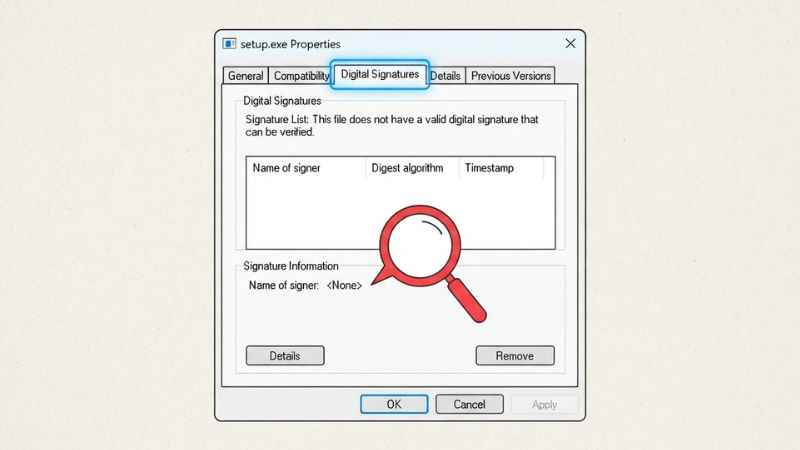
Right-click the executable file (.exe) on your computer and select Properties. Click the Digital Signatures tab. Real software from trusted companies lists a verified developer name. If the signature is missing or marked invalid, the file is unsafe.
Step 2: Look Up the Software Directory Records
Legitimate business and workflow tools maintain public profiles on verified software directories like G2 or Capterra. Searching these directories for “Immorpos35.3” brings up zero verified software listings.
Step 3: Scan the File Hash
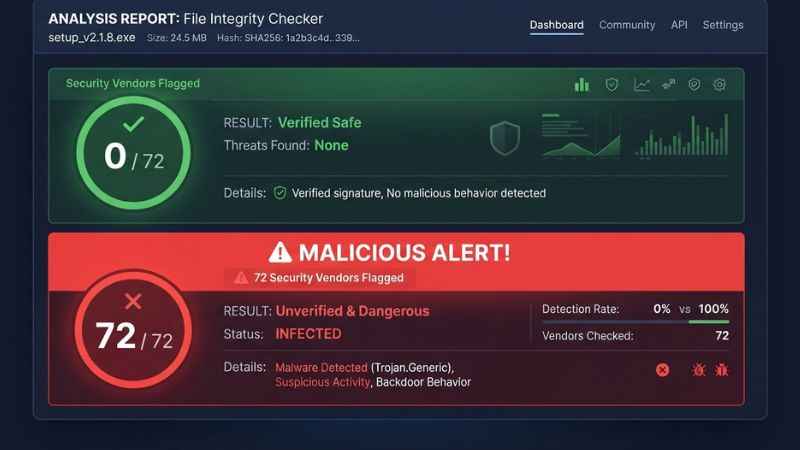
Upload the suspicious file to VirusTotal, a free online scanner. It checks the file against many antivirus engines to detect hidden threats.
Why Are There So Many Articles About Immorpos35.3?
You might wonder why dozens of websites write about this software if it is fake. This pattern matches what experts call scaled content abuse.
Content farming sites use automated AI generators to target low-competition search phrases. They publish many fake “how-to” articles filled with generic software tips. Their main goal is to get you to click on advertisements or download unsafe software bundles.
How to Remove Immorpos35.3 from Your System
If you downloaded a file related to Immorpos35.3, follow these simple steps to perform a general system cleanup:
Step 1: Uninstall Unknown Programs
- Press the Windows Key and type “Add or remove programs.”
- Scroll through the list to find any recently installed programs you do not recognize.
- Click the three dots next to the unknown program and select Uninstall.
Step 2: Remove Suspicious Browser Extensions
- Open your web browser (Chrome, Edge, or Firefox).
- Go to the Extensions or Add-ons menu.
- Look for extensions added around the time your issues started and click Remove.
Step 3: Run a Full System Scan
Open Windows Defender or a trusted scanner like Malwarebytes. Run a full system scan to detect and isolate any hidden registry entries or background scripts.
Safe and Verified Alternatives for Business Automation
If you searched for Immorpos35.3 looking for real workflow or point-of-sale management tools, use these verified options instead:
| Tool Name | Best Used For | Free Plan Available? | Market Presence |
| Zapier | Connecting web apps and automating tasks | Yes | Listed on major review sites |
| Make | Visual workflow automation for data | Yes | Listed on major review sites |
| Monday.com | Team project and business process management | Yes | Yes (G2 & Capterra Listed) |
| Microsoft Power Automate | Enterprise desktop and cloud automation | Included with Windows | Backed by Microsoft |
Frequently Asked Questions
What is Immorpos35.3 software used for?
Claimed descriptions say it handles POS sales and workflow automation. However, there is no verified proof that it functions as a real commercial software program.
Is Immorpos35.3 software safe to download?
No. No well-known official vendor site is confirmed. Downloads from random blogs are not safe.
What is the official website for Immorpos35.3?
No widely recognized official site or developer is confirmed. Some sites use the name but lack clear vendor info.
How do I completely delete Immorpos35.3 files?
Uninstall any unknown programs through your computer settings, clean your browser extensions, and run a complete malware scan using Windows Defender or Malwarebytes.
Why do implementations of Immorpos35.3 software fail?
Implementations often fail due to poor documentation, unclear requirements, and unverified builds, not because the software is proven fake.
You May Also Like:
Thestripesblog Frank Fisher: Social Media Stuff EmbedTree Explained
TheStripesBlog Frank Fisher: Who He Is and How to Verify Contact Information

Joseph Quinn is the founder and editor of Punspa, a technology-focused website covering technology, website reviews, internet terms, and other things worth figuring out online. He writes and edits the site’s technology and web content, with a focus on clear, useful explanations. He also enjoys humor and wordplay, which occasionally leads him to write a pun-related article just for the fun of it.