Shopping for insurance online can feel overwhelming. If you came across mywebinsurance.com, you probably want to know what it is and whether it is safe to use.
MyWebInsurance.com offers insurance information and quote-comparison tools. MyWebInsurance.com says it provides insurance information, guides, and tools to compare quotes from insurance providers. Check the quote flow, disclosures, and final policy terms to verify who issues the policy before you buy.
What Is MyWebInsurance.com?
MyWebInsurance.com is an insurance information website and quote-comparison resource. It gives consumers a central place to start their search for different coverage options.
The site lists several main insurance types, including:
- Auto insurance
- Home and renters insurance
- Life insurance
- Health insurance
- Pet insurance
- Business insurance
MyWebInsurance.com offers tools to compare quotes. The site’s public homepage does not explain who approves applications or sets final pricing. Review the offer terms before applying.
Is MyWebInsurance.com Legitimate?
MyWebInsurance.com presents itself as an insurance guide and comparison resource. However, understanding how to evaluate quote tools helps you use them safely.
To evaluate any online comparison site, split the experience into three parts:
- The platform’s role: Check the site’s terms and privacy policy to understand its exact services before sharing information.
- The insurance company: The company that writes your policy handles your payments and claims.
- Your data privacy: Read the site’s privacy policy to learn how your contact info and personal details may be used.
You should never assume any quote site is 100% risk-free. Follow this simple safety checklist before submitting your details:
- Check the web address: Make sure you are on the real domain before typing personal info.
- Read the privacy terms: Look for details on how the site shares or sells your data.
- Find direct contact details: Look for a real customer service phone number or mailing address.
- Verify the insurer: Check your state insurance department website to make sure the final insurance company holds a valid license.
- Look up complaint records: Use the National Association of Insurance Commissioners (NAIC) website to check an insurer’s complaint history.
- Protect sensitive data: Avoid sharing your Social Security number or bank details just to get a preliminary price estimate.
How Does MyWebInsurance.com Work?
Using a comparison site is straightforward. Here is how the process usually goes step by step:
- Pick a coverage type: Select the policy you need, such as auto, home, or life insurance.
- Enter basic details: Input your ZIP code and basic profile information.
- Review your options: Review the information or quote options shown in the tool.
- Compare choices: Look at coverage limits, deductibles, and company track records side by side.
- Connect with a seller: Review the next steps shown by the tool and any offer disclosures.
- Finish underwriting: Complete the official application to get your real, final price.
Note on Price Estimates: A preliminary quote from a comparison site is an estimate. It is not a binding price lock. Final rates can change after the insurance company reviews your full application and official records.
What Information May Be Requested?
To show you initial estimates, quote forms commonly ask for basic details like your ZIP code, age, vehicle information, and broad coverage preferences.
Be careful if a site asks for sensitive personal identifiers early in the process. Users should be careful before giving sensitive information and should check why it is needed to see starting estimates.
Insurance Types You Can Explore on MyWebInsurance.com
Insurance platforms let you research several categories in one place. Here is what consumers usually compare across common policy types:
| Insurance Type | What Users Compare | Key Decision Factor |
|---|---|---|
| Auto | Liability, collision, comprehensive, and deductibles | Buy adequate protection limits, not just the lowest price. |
| Home | Dwelling limits, personal property, and liability | Match coverage to actual rebuild costs, not market value. |
| Renters | Personal belongings and liability options | Remember landlord policies do not cover your personal property. |
| Life | Term length, coverage amounts, and policy riders | Pick a clear coverage amount that protects family expenses. |
| Health | Doctor networks, copays, and out-of-pocket maximums | Check network rules and total yearly out-of-pocket limits. |
| Pet | Accident, illness, and wellness add-ons | Watch out for pre-existing condition rules and waiting periods. |
| Business | General liability, property, and professional liability | Choose limits that match your specific industry risks. |
Are MyWebInsurance.com Quotes Accurate?
Initial quotes on comparison websites are estimates. They use the basic profile details you type into the form. They are not final sales prices.
Your final price comes after official underwriting. For some policies, the insurer may review details such as driving history, claims history, or other records allowed by law. Any difference between your form answers and official records can change the rate.
To get the most accurate price comparison:
- Request identical coverage limits and deductibles from every company.
- Keep your answers as accurate as possible.
- Get your final quote details in writing before you pay.
Is MyWebInsurance.com Safe for Your Personal Information?
Data privacy is an important step when shopping online. Comparison platforms treat user data in different ways. Some sites show instant rates directly on screen. Others pass your contact info along to outside agents or lead generation partners.
Consumer advocacy groups, like Consumer Reports, warn that some quote-comparison websites may share personal data with marketing partners. This can lead to unwanted phone calls, text messages, and sales emails.

Use this privacy checklist to protect yourself:
- Read the fine print: Search the privacy policy for words like “share,” “sell,” “partners,” or “affiliates.”
- Check consent boxes: Read the terms above the submit button carefully to see who is allowed to call you.
- Use a secondary email or phone: Set up a separate email address or secondary phone number for online quote forms.
- Keep sensitive data private: Do not enter banking info or Social Security details during early price checks.
- Opt out of marketing: You can register with the federal Do Not Call Registry, but it may not stop all calls.
- Get direct quotes too: Visit a few insurer websites directly to compare their privacy steps.
MyWebInsurance.com vs. Direct Insurers vs. Independent Brokers
There is no single best way to shop for coverage. Each shopping channel offers unique pros and cons depending on your needs.
| Option | Best For | Main Advantage | Main Limitation |
|---|---|---|---|
| MyWebInsurance.com / Comparison Site | Early research and quick initial price discovery | Convenient way to see multiple choices at once | Check which insurers, if any, are included before relying on the results. Quotes are estimates. |
| Direct Insurer | Shoppers who already know the exact carrier they want | Direct relationship with the company issuing the policy | Requires you to visit each website and fill out forms separately. |
| Independent Broker | Complex needs, business coverage, or personal advice | Get customized help from a licensed human agent | An independent agent or broker may work with a limited group of insurers. |
How to Compare Insurance Quotes Safely
Finding cheap insurance is helpful, but picking weak coverage can cost you more later. Use these practical steps to compare policies safely:
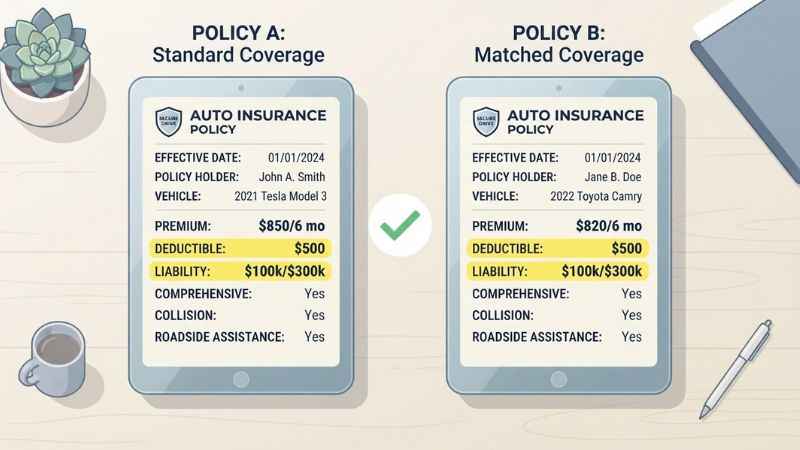
- Match coverages exactly: Make sure each quote uses identical limits, deductibles, and policy add-ons.
- Look beyond the monthly cost: A cheap plan with high deductibles can cost you thousands during a claim.
- Read policy exclusions: Pay attention to what the policy explicitly refuses to cover.
- Verify state licenses: Check your state insurance department directory to make sure the agent and carrier hold active licenses.
- Check financial strength ratings: Financial strength ratings from agencies like AM Best can help show an insurer’s ability to pay claims, though they do not guarantee payment.
- Review coverage regularly: Update your insurance terms after major life events like buying a home or changing jobs.
Pros and Cons of Using MyWebInsurance.com
Potential Pros
- Provides a convenient central spot to start your research.
- Covers multiple insurance types on one website.
- Check site terms to see how tools and quote features are offered.
- Helps you learn about different coverage choices before buying.
Potential Cons
- Check disclosures to confirm the site’s underwriting role and policy policies.
- The site does not clearly list all insurers or providers included in its quote tools.
- Initial price quotes are estimates and can change later.
- Read the site’s privacy policy before submitting forms to understand data-sharing terms.
- Complex insurance needs still require direct help from a licensed professional.
Who Should Use MyWebInsurance.com?
MyWebInsurance.com is best for:
- First-time buyers who want a broad view of their options.
- Shoppers who are just starting to gather general rate estimates.
- Consumers who feel comfortable reading policy details on their own.
It may not be ideal for:
- Businesses needing custom commercial insurance terms.
- Shoppers who prefer working face-to-face with a local agent.
- People who prefer not to share contact details before reading a site’s privacy terms.
Frequently Asked Questions
What is MyWebInsurance.com?
MyWebInsurance.com is an online insurance comparison tool and educational resource. It helps users research coverage types and compare available options.
Is MyWebInsurance.com an insurance company?
The site describes itself as an insurance guide and quote-comparison tool. Review its disclosures to verify its platform features.
Is MyWebInsurance.com legitimate?
The site presents itself as an insurance guide and quote-comparison resource. Users should check the license of any final insurance company before buying.
Is MyWebInsurance.com free to use?
The site does not clearly publish pricing for using its tools. Check its terms before assuming it is free.
Can I buy a policy directly on MyWebInsurance.com?
Users should check the quote flow and disclosures to see how the purchase is completed.
Are quotes on MyWebInsurance.com final?
No, initial quotes are estimates. Your final rate is set after the insurance company completes full underwriting checks.
Is it safe to submit my information on MyWebInsurance.com?
Always read the privacy policy before submitting a form to understand how your information is handled.
Should I use MyWebInsurance.com or an insurance agent?
Use a comparison site if you want quick, self-guided market research. Work with a licensed agent if you have complex assets or need personal guidance.
Bottom Line: Should You Use MyWebInsurance.com?
MyWebInsurance.com can be a helpful starting point for your insurance research. It gives you a simple overview of options across several policy types.
To shop safely, treat the platform as a starting resource rather than the final authority. Always verify the license of the actual insurance carrier, compare quotes using identical coverage limits, and protect your personal privacy steps along the way.
You May Also Like:
SomeArticles.com Explained: What It Is and How to Verify It
What Is BagelTechNews.com? The Complete Guide to This Tech News Hub

Joseph Quinn is the founder and editor of Punspa, a technology-focused website covering technology, website reviews, internet terms, and other things worth figuring out online. He writes and edits the site’s technology and web content, with a focus on clear, useful explanations. He also enjoys humor and wordplay, which occasionally leads him to write a pun-related article just for the fun of it.